
MCP Server
Connect ChatGPT, Claude and other AI assistants to a Nimbu site: step-by-step setup, permissions, access tokens, the tool reference and limits.
Connect ChatGPT, Claude or another AI assistant to your Nimbu site and you can ask it to do the work for you in plain language: "find the product called Winter Jacket and lower its price to €89", "translate the About page to French", "which orders came in this week?". The assistant looks things up and makes changes on your site as you.
This works through the Model Context Protocol (MCP), an open standard that lets AI assistants talk to other services. You don't need to know how it works. All you need is this address:
https://mcp.nimbu.io/mcpCopy it exactly, including /mcp at the end. A small typo, such as .be instead of .io or a
missing /mcp, is enough for the connection to fail.
Before you start
You need a Nimbu account that has access to the site, and you sign in with your normal Nimbu login. The assistant can never do more than you can do yourself on that site.
Your assistant also has to support custom MCP servers. ChatGPT and Claude both do, depending on your plan. In a company workspace, an admin may have to allow it first.
You connect once, and it takes a couple of minutes. Each connection is for one site, so if you work on several Nimbu sites, connect once per site.
Connect ChatGPT
Open Plugins
Open ChatGPT and click Plugins in the sidebar on the left. You land on a page titled Plugins: "Connect plugins to let ChatGPT work across your tools".
Choose "Create custom MCP server"
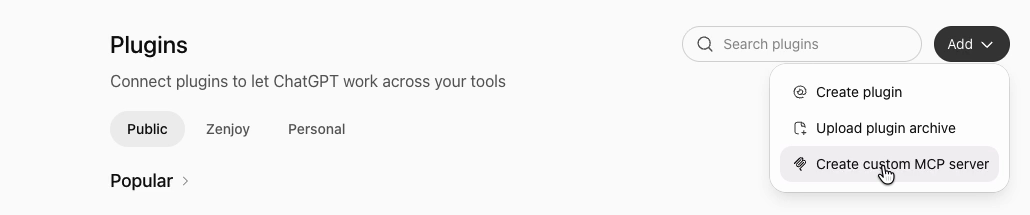
Click the Add button in the top right corner and choose Create custom MCP server.
Fill in the form
A window called Create custom MCP server opens. Fill it in like this:
| Field | What to enter |
|---|---|
| Icon (optional) | Skip it. ChatGPT picks up the Nimbu logo by itself. |
| Name | Nimbu |
| Description (optional) | Leave empty, or write something like "Our website". |
| Connection | Keep Server URL selected and paste https://mcp.nimbu.io/mcp |
| Authentication | Leave it on OAuth |
| Advanced OAuth settings | Don't open it. The defaults are right. |
Then tick I understand and want to continue and click Create as a plugin.
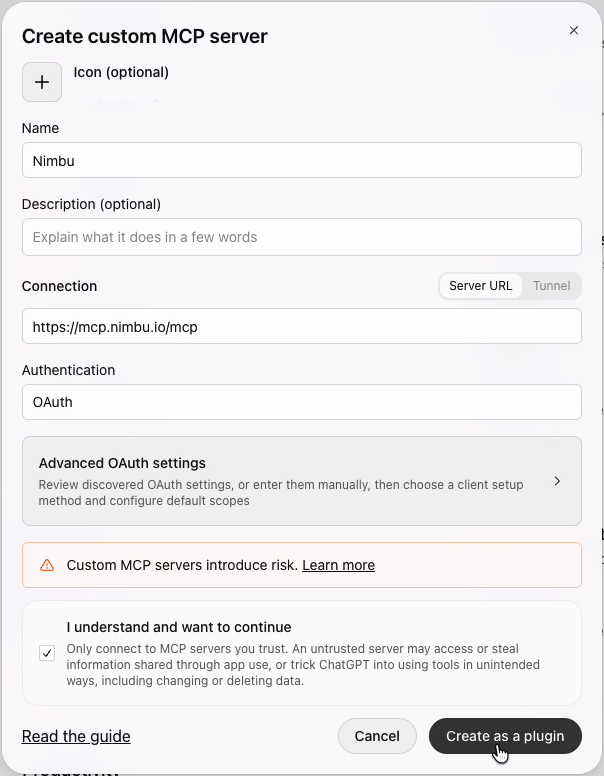
ChatGPT shows the "Custom MCP servers introduce risk" warning for every server it doesn't know. You can't skip the checkbox. What the assistant may do on your site is decided in the next steps, on the Nimbu side.
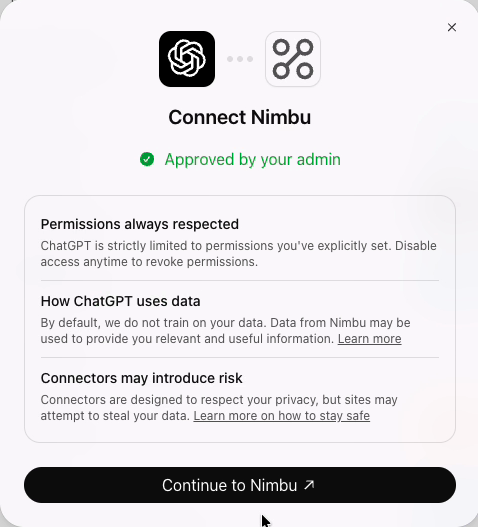
Sign in and give access
A Nimbu page opens. Sign in if Nimbu asks you to. Then check the page:
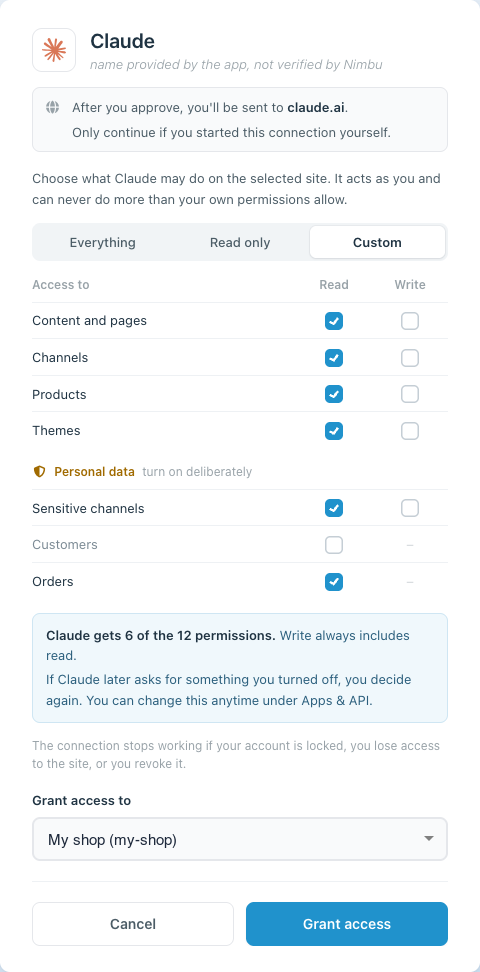
- At the top it says ChatGPT with chatgpt.com below it. That is the app asking for access.
- Under Grant access to, pick the site you want to connect. Type a few letters to search.
- The table lists what ChatGPT asks to read and change on your site. Tick only what you want it to have, or use Read only to keep it from changing anything. Customers, orders and other personal data start switched off; turn them on deliberately. See The Nimbu consent page for the details.
Click Grant access. Nimbu shows this page in the language of your account. The screenshot below shows it for Claude, with customers switched off; for ChatGPT it looks the same.
Done
ChatGPT confirms that the account is connected. Nimbu now shows up under Installed in the sidebar, and on the Personal tab of the Plugins page under Created by you.
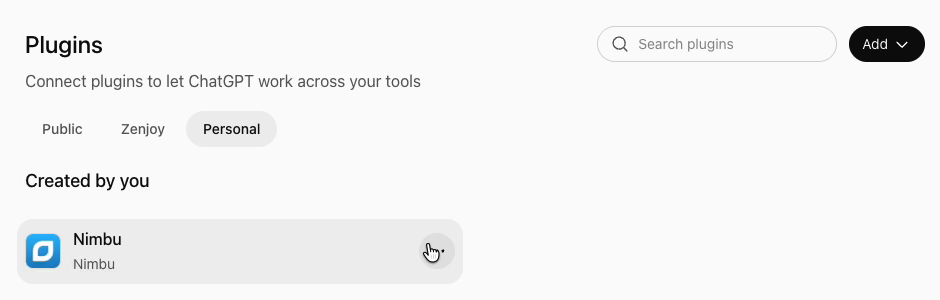
To try it, click the ··· next to Nimbu and choose Try now, or start a new chat and ask something about your site.
No "Create custom MCP server" in the Add menu?
Your ChatGPT plan or workspace doesn't allow custom MCP servers yet. In a company workspace, ask the person who manages ChatGPT for your team to enable it.
Share it with your team
The plugin you created is personal: only you see it. If you manage your company's ChatGPT workspace, open the plugin through ··· → Manage and click Publish to workspace so your colleagues can add it too. Everyone still signs in with their own Nimbu account, so each person keeps their own permissions.
Connect Claude
On a Free, Pro or Max plan:
- In Claude, go to Customize → Connectors.
- Click + Add and choose Add custom connector.
- Enter
Nimbuas the name andhttps://mcp.nimbu.io/mcpas the URL, then click Continue. - Leave the authentication settings as they are and click Add.
- Click Connect next to Nimbu. Claude sends you to the Nimbu page from step 5 above: sign in, pick your site and click Grant access.
On a Team or Enterprise plan, an owner adds the connector once for the whole organisation under Organization settings → Connectors (Add → Custom → Web, same name and URL). Each member then goes to Customize → Connectors, finds Nimbu and clicks Connect.
To use Nimbu in a conversation, click the + button at the bottom left of the message box, open Connectors and make sure Nimbu is switched on.
For Claude Code, add the server from a terminal and follow the browser prompt:
claude mcp add --transport http nimbu https://mcp.nimbu.io/mcpThe buttons look different?
ChatGPT and Claude rename their menus from time to time. If a label on this page doesn't match
what you see, look for the place to add a custom connector, custom MCP server or plugin. The
address https://mcp.nimbu.io/mcp and the Nimbu sign-in page stay the same.
Other MCP clients
This section is for developers and tools like Cursor or VS Code.
The server speaks Streamable HTTP on a single stateless endpoint and returns JSON (no SSE stream, no session id). Enter the URL exactly as shown: some clients compare it character by character with the address the server reports during setup. For OAuth, clients discover everything from the server:
- Protected resource metadata:
https://mcp.nimbu.io/.well-known/oauth-protected-resource - OAuth 2.1 authorization code flow with PKCE (
S256) - Client registration through dynamic client registration or a Client ID Metadata Document
If your client can't do OAuth, create an MCP access token and send it as a
bearer token. For clients configured with an mcp.json file (Cursor, VS Code and others):
{
  "mcpServers": {
    "nimbu": {
      "url": "https://mcp.nimbu.io/mcp",
      "headers": {
        "Authorization": "Bearer <your-mcp-token>"
      }
    }
  }
}
With Claude Code:
claude mcp add --transport http nimbu https://mcp.nimbu.io/mcp \
  --header "Authorization: Bearer <your-mcp-token>"
The Nimbu consent page
Whenever an assistant connects through OAuth, Nimbu shows a consent page before anything is granted. From top to bottom:
- The app that is asking, with the domain it comes from below its name (for example
chatgpt.comorclaude.ai). Anyone can give an app any name, so when a client is identified only by its domain, Nimbu says so in a yellow warning. Trust the domain, not the name. - Where you end up after approving ("After you approve, you'll be sent to …"). A desktop or command-line client shows an address on your own device instead.
- Grant access to, where you pick one of the sites your account can use.
- A table of checkboxes with a Read and a Write column for each kind of data the app asked for: content and pages, channels, products, coupons, themes, and in a separate Personal data group sensitive channels, customers and orders. A dash instead of a checkbox means the app didn't ask for that access.
- A line below the table that counts how many of the requested permissions the app gets with your current choice.
You decide what the app gets:
- Quick choice sets the whole table at once: Everything, Read only or Custom. You can still tick and untick single boxes afterwards.
- The Personal data group starts unchecked on a first connection. Turn it on only when the assistant really needs customer, order or privacy-sensitive data.
- Write always includes read, and privacy-sensitive channels include regular channels. Ticking Write for orders also ticks Read.
- You can only grant less than the app asked for, never more.
What the app can actually do is also limited by your own role on the site, see Permissions. In ChatGPT, developers can also narrow the request under Advanced OAuth settings when they create the server.
When a connected app comes back for more access, the same page opens with the title "… is asking for more access". Your earlier choices stay. What the app asks for the first time is checked and marked newly requested; what you turned off before stays off and is marked turned down before. The site of the existing connection is already selected.
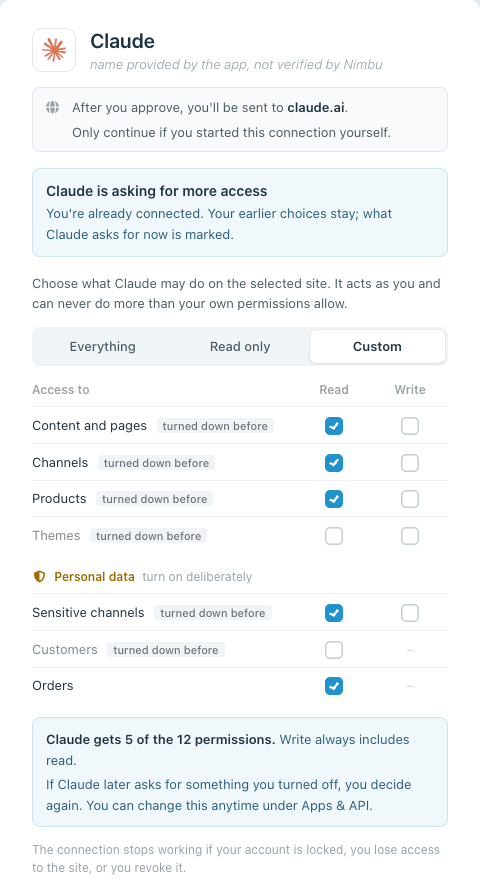
Only continue if you started this
If a consent page appears that you didn't start yourself, or the domain isn't the assistant you meant to connect, click Cancel. Approving hands that app access to your site as you.
Access tokens issued through OAuth last two hours and the client refreshes them in the background. If a client later needs a permission you didn't grant, it can ask again and you'll see the consent page for the extra access.
Permissions
A connection can use two things at once: the scopes you approved, and your own permissions on the selected site. Both have to allow an action. If an admin narrows your role later, the connection narrows with it on the next request. It stops working altogether if your account is locked, you lose access to the site, or the connection is revoked.
These are the scopes an MCP connection can request:
| Scope | Shown as | Allows |
|---|---|---|
read_content | read content | Pages and their drafts, blogs and articles, menus, translations, the media library |
write_content | update content | Create, edit, publish and delete pages and articles; translations; uploads |
write_raw_html | write raw HTML and embeds | Raw HTML and embeds (script, iframe, style) in page content |
read_channels | read channels | Channels and their entries |
write_channels | update channels | Create, edit and delete channel entries |
read_sensitive_channels | read privacy-sensitive channels | Entries in channels marked as privacy-sensitive |
write_sensitive_channels | update privacy-sensitive channels | Changing entries in privacy-sensitive channels |
read_products | read products | Products and collections |
write_products | update products | Create and edit products; create, edit and delete collections |
read_orders | read orders | Orders |
write_orders | update orders | Order status steps (payment, finish, cancel, reopen, archive) and internal comments |
read_customers | read customers | Customers and their addresses |
write_customers | update customers | Create and edit customers and addresses; suspend, resume, password reset and confirmation e-mails |
read_coupons | read coupons | Coupons (discount codes) |
write_coupons | update coupons | Create, edit, expire and delete coupons |
read_themes | read theme code | Theme layouts, templates, snippets and assets |
write_themes | update themes | Create and update theme files |
A few rules follow from how scopes are checked:
- A write scope includes its read scope.
write_contentis enough to read pages. - Tools the connection can't use are hidden. A connection without write scopes never sees the write tools in its tool list, so the assistant can't even try to call them.
search,fetch,list_sitesandget_siteneed no scope.searchandfetchonly return the kinds of records your scopes allow.- A connection with no scopes at all only sees its own connection details.
write_raw_htmlstands on its own.write_contentdoesn't include it, and it allows nothing withoutwrite_content. Your role on the site also needs the right to edit raw HTML.
Order and customer writes behave like the buttons in the admin. Besides write_orders or
write_customers, your own role needs the order or customer permission on the site; without it
the call is refused with a 403.
Revoke access
Connections and tokens are listed in the Nimbu admin under Settings → Apps & API:
- Connected AI agents lists every OAuth connection to the site, with the user it acts as and when it was last used. Click Disconnect to revoke one, or Edit permissions to take away part of its access.
- MCP Access Tokens lists the dedicated tokens. Click Revoke and confirm to delete one.
Revoking takes effect right away. Edit permissions opens the same checkbox table as the consent page, but it only narrows: the assistant loses the tools that no longer fit, right away. To give an assistant more access, connect it again from the assistant itself, so the person it acts for approves the extra access on the consent page.
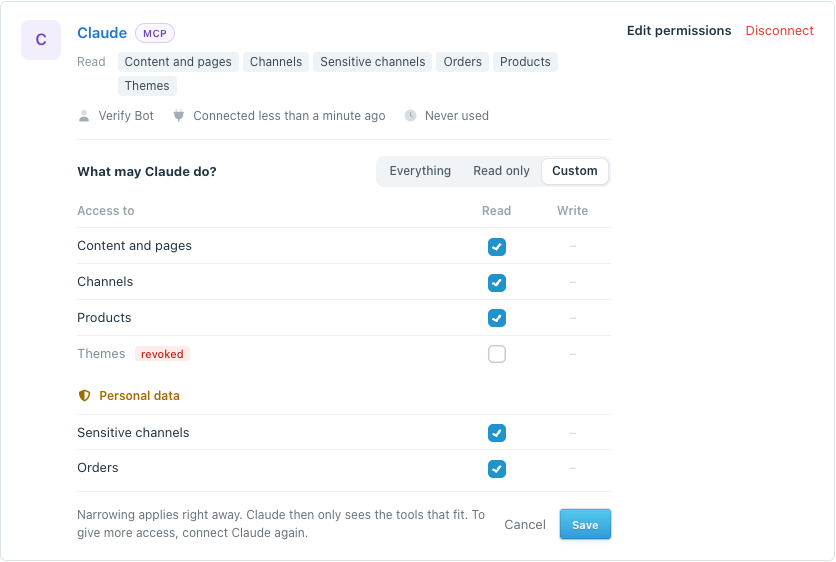
If you don't see Apps & API in the settings menu, ask someone who manages the site's settings to disconnect the assistant for you.
MCP access tokens
For clients that take a token in their configuration instead of doing OAuth (Cursor, VS Code, CI jobs, your own scripts), create a dedicated MCP access token:
- Go to Settings → Apps & API and click Create MCP token (or New MCP token once you have one) in the MCP Access Tokens section.
- Give it a name you'll recognise later, and pick only the scopes the assistant needs.
- Pick an expiry: 90 days, 1 year (the default) or never.
- Save and copy the token into your client's configuration.
An MCP token acts as the user who created it, on the site it was created for, and it follows that
user's permissions just like an OAuth connection. It only works on mcp.nimbu.io; the REST API at
api.nimbu.io rejects it. The reverse is true as well: a regular Site Access Token or REST token
won't work on the MCP server. Create one MCP token per assistant so you can revoke one without
touching the others.
Tools
The server exposes 65 tools. Your client shows the subset your scopes allow.
Search
| Tool | What it does | Scope |
|---|---|---|
search | Full-text search across pages, products, collections and channel entries; customers and orders only when asked for explicitly | none (results follow scopes) |
fetch | Fetch the full record for a search result | none (results follow scopes) |
Customers and orders hold personal data, so search leaves them out unless the request names them
and the connection has read_customers or read_orders.
| Type | Searched by default | Scope | fetch id |
|---|---|---|---|
page | yes | read_content | page:<id> |
product | yes | read_products | product:<id> |
collection | yes | read_products | collection:<id> |
entry | yes | read_channels | entry:<channel-slug>:<id> |
customer | no, name it in types | read_customers | customer:<id> |
order | no, name it in types | read_orders | order:<id> |
Pass a result's id to fetch unchanged. Types the connection has no scope for are dropped, and
the response's types lists what was actually searched. degraded: true means the search for one
type failed and its results are missing, so retry instead of treating the answer as complete.
Pages and navigation
| Tool | What it does | Scope |
|---|---|---|
list_pages | List the site's pages | read_content |
get_page | Read a page's content, including a content_etag | read_content |
get_page_draft | Read a page's shared draft, the unpublished version editors work on | read_content |
create_page | Create a page (a draft unless you ask for it to be published) | write_content |
update_page | Change a page's title, slug, template, parent or SEO fields | write_content |
update_page_content | Edit a page's live content with up to 10 operations per call | write_content |
update_page_draft | Edit a page's shared draft; nothing goes live | write_content |
publish_page | Publish a page, take it offline, or put its draft live | write_content |
delete_page | Permanently delete a page and its child pages | write_content |
list_menus | List the site's navigation menus | read_content |
get_menu | Read one menu and its items | read_content |
Page edits are protected against overwriting someone else's work. update_page and
update_page_content need the content_etag from a recent get_page; if the page changed in the
meantime, the write is refused and the assistant has to read the page again. delete_page only
proceeds when the assistant passes the page's current title. Raw HTML and embeds in page content
also need write_raw_html.
Shared drafts. A page can have a shared draft: the unpublished version that everyone in the page editor works on together. The assistant can work on it too:
update_page_draftneeds theetagfromget_page_draft(or the page'scontent_etagwhen it has no draft yet). The editor shows the fields the assistant rewrote as changed by it on your behalf, with an Undo.- A field someone edited in the last few seconds is refused with
field_busyand aretry_after, so the assistant doesn't type over a colleague. - When the draft holds its own unpublished change to a field,
update_page_contentandupdate_pagerefuse to change that field on the live page (draft_deviation). Change the draft instead. - Putting a draft live takes two calls.
publish_pagewithdraft: truereturns a candidate: what changes per language, who contributed, who is editing right now, and which parent pages go live with it. Nothing is published yet. Callingpublish_pageagain with thatcandidate_idpublishes exactly what was reviewed. If the draft or the live page changed in between, the confirm is refused and the assistant has to ask for a new candidate.
Blogs
| Tool | What it does | Scope |
|---|---|---|
list_blogs | List the site's blogs | read_content |
query_articles | Query one blog's articles with filters, sorting and pagination | read_content |
get_article | Read one article by id or slug | read_content |
create_article | Create an article, always as a draft | write_content |
update_article | Change only the fields you pass; publication fields are refused | write_content |
publish_article | Publish an article, schedule it (with publish_at) or take it offline | write_content |
delete_article | Permanently delete an article | write_content |
Publishing is a separate step, like for pages: create_article and update_article refuse
status and publish_at, so an article the assistant writes stays a draft until publish_article
puts it live. To take an article offline but keep it, use publish_article with status: "draft"
instead of deleting it.
Channels and translations
| Tool | What it does | Scope |
|---|---|---|
list_channels | List the site's channels | read_channels |
describe_channel | Show a channel's fields | read_channels |
query_channel_entries | Query entries with filters, sorting and pagination | read_channels |
get_channel_entry | Read one entry | read_channels |
create_channel_entry | Create an entry | write_channels |
update_channel_entry | Change only the fields you pass | write_channels |
delete_channel_entry | Permanently delete one entry | write_channels |
list_translations | List the site's translation strings | read_content |
upsert_translations | Create or update up to 100 translation strings in one call | write_content |
Channels marked as privacy-sensitive also need read_sensitive_channels or
write_sensitive_channels. Per-entry access rules apply to MCP just as they do to the API.
On channels with publishing enabled, create_channel_entry and update_channel_entry take two
arguments for the publication state:
status:draft,publishedorscheduled. A create withoutstatusis a draft; an update without it leaves the state alone.publish_at: an ISO 8601 timestamp, required whenstatusisscheduled.
An unknown status, scheduled without publish_at, or a malformed timestamp is refused before
anything is written. On a channel without publishing, passing status returns a 422. To find
unpublished entries, call query_channel_entries with filters: {"_status": "draft"} (or
published, scheduled).
Products and collections
| Tool | What it does | Scope |
|---|---|---|
query_products | Query products with filters, sorting and pagination | read_products |
get_product | Read one product by id or slug | read_products |
create_product | Create a product | write_products |
update_product | Change only the fields you pass, or remove variants | write_products |
list_collections | List product collections | read_products |
get_collection | Read one collection by id or slug | read_products |
create_collection | Create a collection | write_products |
update_collection | Change a collection's name, description, slug or status | write_products |
delete_collection | Permanently delete a collection; its products stay | write_products |
add_product_to_collection | Add a product to a collection | write_products |
remove_product_from_collection | Remove a product from a collection; the product stays | write_products |
Stock and inventory fields are ignored on product writes. To delete variants, pass their ids in
update_product's remove_variant_ids (at most 50 per call). Nimbu checks that every id is a
variant of that product.
To list the products in a collection, call query_products with
filters: {"collection_ids": "<collection-id>"}.
Orders
| Tool | What it does | Scope |
|---|---|---|
query_orders | Query orders with filters, sorting and pagination | read_orders |
get_order | Read one order by id or order number | read_orders |
update_order_status | Run a step from the admin order screen (see below) | write_orders |
update_order | Replace an order's internal comments | write_orders |
update_order_status takes one action:
| Action | What it does | Only works when the order is… |
|---|---|---|
record_payment | Register a manual payment for the full order total | completed or in payment, not yet paid |
finish | Mark the order as done (shipped) | completed and paid |
cancel | Cancel the order, with an optional cancel_reason | completed |
reopen | Move the order back to completed | done or canceled |
archive | Archive the order | done or canceled |
An order in the wrong state is refused with a 422, just like the buttons in the admin. For
finish and cancel the assistant has to pass notify: true e-mails the customer the shipping
or cancellation notification, false doesn't. There is no default, so a customer is never e-mailed
(or left uninformed) by accident.
update_order only changes the internal comments, which customers never see. Orders can't be
deleted through MCP.
Customers
| Tool | What it does | Scope |
|---|---|---|
query_customers | Query customers with filters, sorting and pagination | read_customers |
get_customer | Read one customer by id or email, including addresses | read_customers |
create_customer | Create a customer | write_customers |
update_customer | Change only the fields you pass | write_customers |
create_customer_address | Add an address to a customer | write_customers |
update_customer_address | Change one of a customer's addresses | write_customers |
delete_customer_address | Permanently delete one address | write_customers |
customer_account_action | suspend, resume, reset_password or resend_confirmation | write_customers |
The customer tools never handle secrets:
- Passwords and tokens are never returned, and you can't filter or sort customers on them.
create_customerandupdate_customerrefuse passwords, tokens,verified_email,skip_confirmation,skip_welcomeandsuspendedwith a400. Usecustomer_account_actionfor the account state.- A new customer gets the confirmation e-mail and picks their own password through its activation
link. If that e-mail couldn't be sent, the result carries a
_warning. update_customercan't change the e-mail address. Do that in the Nimbu admin.reset_passworde-mails the customer a reset link; the assistant never sees the link or token.
customer_account_action fails with a 422 when the customer is already in the requested state,
for example resume on a customer who isn't suspended. The default billing or shipping address
can't be deleted: make another address the default with update_customer_address first.
Coupons
| Tool | What it does | Scope |
|---|---|---|
query_coupons | Query coupons (discount codes) | read_coupons |
get_coupon | Read one coupon | read_coupons |
create_coupon | Create a coupon; name, code, coupon_type and lifespan are required | write_coupons |
update_coupon | Change only the fields you pass | write_coupons |
expire_coupon | Stop a coupon right away and keep its history | write_coupons |
delete_coupon | Permanently delete a coupon that was never redeemed | write_coupons |
Coupon writes accept the same fields as the coupon form in the admin. Store-credit coupons can't be
created or changed through MCP. A coupon that has been redeemed can't be deleted (the call answers
404); expire it instead.
Files
| Tool | What it does | Scope |
|---|---|---|
list_uploads | List the files in the site's media library | read_content |
upload_file | Upload a small file to the media library | write_content |
An upload returns a file_ref that the assistant can put in an image or file field of a channel
entry or product. Channel entries, products and pages can also take a small file inline in the same
write call.
Theme
| Tool | What it does | Scope |
|---|---|---|
list_theme_files | List a theme's layouts, templates, snippets and assets | read_themes |
get_theme_file | Read one theme file's source | read_themes |
update_theme_file | Create or update a layout, template or snippet | write_themes |
A change to a file in the active theme goes live on your storefront immediately, the same as
saving it in the admin or pushing it with the CLI. Nimbu doesn't ask for a second confirmation.
Grant write_themes only when you want the assistant to change theme code.
A theme file that someone last edited in the Nimbu admin is locked, and update_theme_file won't
overwrite it.
Site
| Tool | What it does | Scope |
|---|---|---|
list_sites | Return the site this connection is bound to | none |
get_site | Read that site's details, including its languages | none |
Tools never take a site argument. To work on another site, connect again and pick that site.
Languages
Content tools for pages, menus, channel entries, products, collections, translations, search and
fetch take an optional locale argument, such as "nl" or "fr". Leave it out and the tool
uses the site's default language. A write with locale only changes that language and leaves the
others alone. A language the site hasn't enabled is refused; get_site lists the enabled ones.
Page reads always include every language under translations, whatever locale you pass.
Writes and retries
- Every create tool requires an
idempotency_key(a UUID):create_page,create_article,create_channel_entry,create_product,create_collection,create_customer,create_customer_address,create_couponandupload_file. Retrying with the same key and the same input returns the original result instead of creating a duplicate. The same key with different input is refused withidempotency_conflict. While the first attempt is still running, or when its outcome is unknown, the answer isidempotency_in_progress: check whether the record exists, and don't retry with a new key. update_product,update_channel_entryandupdate_customerare not idempotent. Repeating an update can apply an increment twice or add another file or nested record. After a timeout or a lost response, read the record again and check what changed before you retry.update_order_statusandcustomer_account_actionaren't either. A secondfinishorsuspendis refused with a422, and a secondrecord_paymenton an order that is already paid too. Read the order or customer first to see whether the first call landed.- Nested records, such as variants or addresses, are never deleted by sending
_destroy. Deleting always goes through an explicit, id-based call: a delete tool, adeleteoperation inupdate_page_content, a gallery item with"remove": true, orremove_variant_ids. update_page_contentneeds the page's currentcontent_etag, so a retry after a write that did land is refused. Read the page again to see the result and get the new etag.- Tools publish
destructiveHint,idempotentHintandopenWorldHintannotations. They help a client explain what a tool does, but they are hints, not a permission or confirmation check.
Limits
- Uploads are limited to 700 KB after base64 decoding, for
upload_fileand for inline files. Accepted types are PNG, JPEG, GIF, WebP and PDF. SVG is not accepted. Use the Nimbu admin or the CLI for larger files. - Each connection can make 600 read calls and 60 write calls per five minutes.
searchhas its own budget that depends on how many record types and results it asks for. Over the limit, the server answers with429and aRetry-Afterheader. - A single request may batch at most 20 tool calls.
- Lists return at most 50 items per page. Responses over roughly 50 KB are cut short, so narrow a
query with filters or a smaller
per_page. - Menus are read-only. Edit them in the Nimbu admin.
- Some things are deliberately not available through MCP: stock changes, deleting orders, customer passwords and e-mail address changes, store-credit coupons, webhooks, site settings, Cloud Code, and bulk or filtered deletes.
For client developers
- Protocol version. The server checks the
MCP-Protocol-Versionheader. It currently accepts2026-07-28,2025-11-25,2025-06-18,2025-03-26and2024-11-05; without the header it assumes2025-03-26. Any other value returns400 unsupported_protocol_version, before authentication. - Tool list changes. The server doesn't advertise
listChangedand never sendsnotifications/tools/list_changed. The tool list still depends on the granted scopes, so calltools/listagain after a scope step-up or when a call returns403 insufficient_scope. - Structured content. Every result has
structuredContentand the same JSON in a text block.structuredContentis always an object: a list comes back as{"items": [...]}, while the text block keeps the bare array. - Partial bulk writes. When a bulk write such as
upsert_translationsdoesn't fully succeed, the tool returns an error withcode: "multi_status", asummaryand per-itemresults. Check each item'sappliedflag: some items may have been written. - Client registration. Nimbu only issues public OAuth clients with PKCE and no client secret.
Dynamic client registration requires
token_endpoint_auth_method: "none". A Client ID Metadata Document that declares an auth method must prefernoneor list it intoken_endpoint_auth_methods_supported.
Security
- Give each assistant the fewest scopes that do the job. Start with read scopes and add write scopes when you actually want changes made.
- Watch for prompt injection. An assistant reads whatever your site contains, including text that visitors and customers typed into forms, orders or channel entries. That text can contain instructions aimed at the assistant. With write scopes granted, a client may carry out an allowed write without asking you first, so review what the assistant proposes before you let it act.
- Some writes reach real people. Finishing or cancelling an order with
notify: true, a password reset, a confirmation e-mail or a new customer all send e-mail to a customer, and a new coupon is a live discount. Grantwrite_orders,write_customersandwrite_couponsonly to an assistant you supervise. - Records the assistant reads, including customer and order data, are sent to the AI provider
behind your assistant. Check that your agreement with that provider covers this data before you
grant
read_customersorread_orders. - Disconnect assistants and revoke MCP tokens you no longer use under Settings → Apps & API.